> ## Documentation Index
> Fetch the complete documentation index at: https://docs.abtestly.com/llms.txt
> Use this file to discover all available pages before exploring further.
# Activity log
> Every meaningful change on every experiment on every site, grouped by day. Who did what, and to which experiment.
Everything that changes state, publishing, pausing, editing a
variant, changing permissions, lands in the activity log. It is the
audit trail.
## Where
**Settings → Activity log** at the workspace level. Or per site,
under **Site → Activity log**, a filtered view of the same feed.
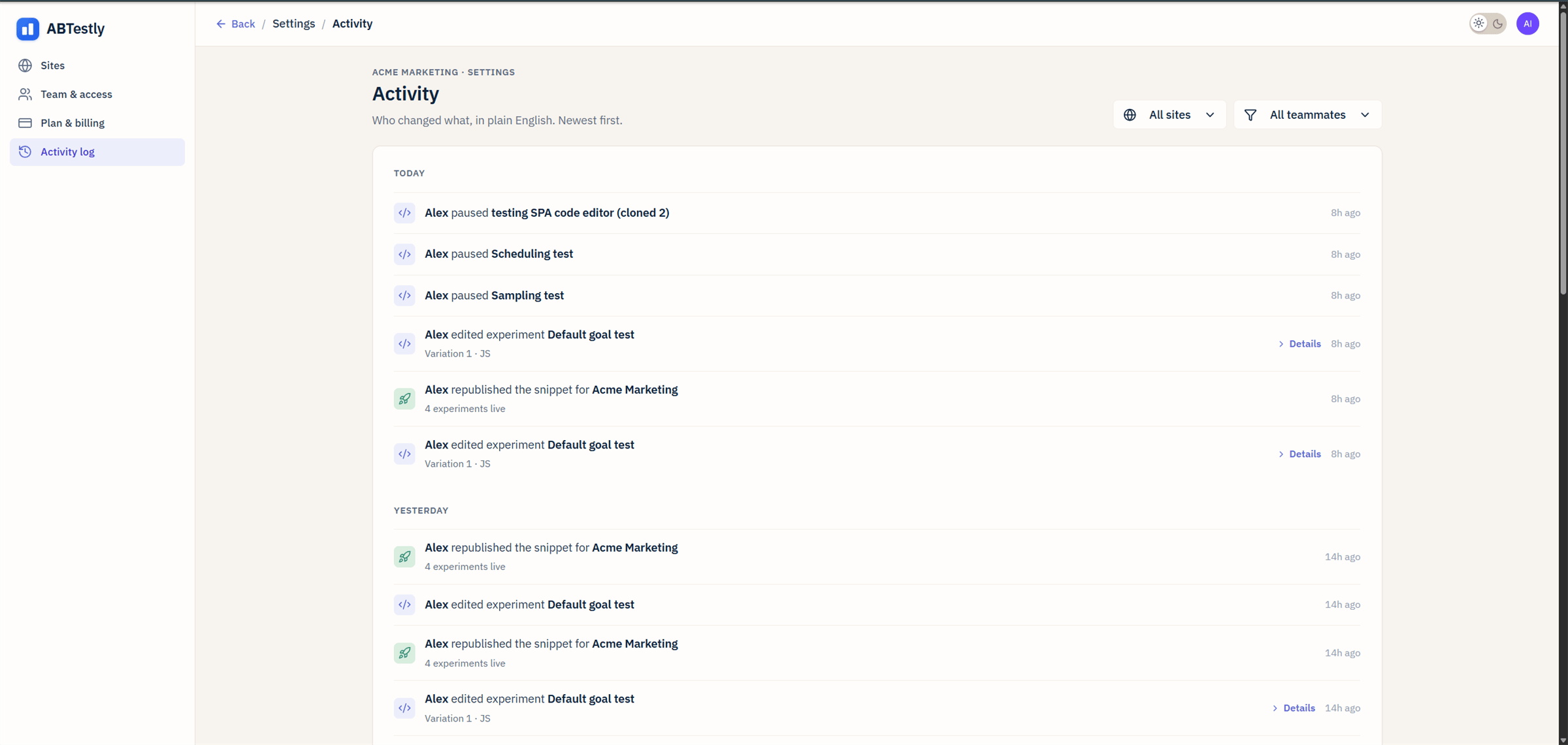 ## The view
Grouped by day: **Today**, **Yesterday**, **Earlier**. Newest event
first inside each group. Each row has:
* **Actor**, who did it.
* **Verb**, paused, published, edited, invited.
* **Object**, the experiment, goal, permission key.
* **Timestamp** in your project timezone.
* **Details** link on structured events (variant edit, permissions
change) opens a dialog with the before/after.
## Filters
All URL-shareable:
* **Actor**, one member.
* **Site**, one site in the workspace.
* **Experiment**, one experiment.
Combine freely. `?actor=&experiment=` shows every action one
person took on one test.
## Deep-link from an experiment
Every experiment detail page has a **Change history** link that opens
the activity log pre-filtered to that experiment.
## What lands in the log
* **Experiment lifecycle**, created, saved, published, scheduled,
cancelled, paused, resumed, republished, archived, restored,
deleted, cloned, data-reset.
* **Content edits**, variant JS/CSS, goals attached/detached,
locations/audiences changed, activation mode changed.
* **Team & access**, invitations, permission toggles, role changes,
removed members.
* **Site settings**, anything under Settings that changes what the
snippet does.
**Not** in the log: reads. Opening the results page does not log
anything.
## Redactions
* **Global JS**, only "edited" is logged, not the code.
* **Variant JS/CSS**, the before/after is truncated to 200 characters
per side.
* **Cookie values** in audience rules, the rule is logged, the value
is not.
Reason: audit logs are often exported. Site-specific keys and
identifiers should not leak into that path.
## Retention
**24 months**, then purged nightly. Export before you need history
older than that.
## Who can see it
Anyone with the **Activity log** permission. Defaults to on for every
role, the audit trail is meant to be visible. Toggle it off per
member if you want a specific person to not see history.
## Programmatic
The Activity log page hits the same worker endpoint your own code
could call. Rate-limited at 100 requests per minute per authenticated
user. Bulk export for compliance systems is not yet a dashboard
button, ask if you need one.
## The view
Grouped by day: **Today**, **Yesterday**, **Earlier**. Newest event
first inside each group. Each row has:
* **Actor**, who did it.
* **Verb**, paused, published, edited, invited.
* **Object**, the experiment, goal, permission key.
* **Timestamp** in your project timezone.
* **Details** link on structured events (variant edit, permissions
change) opens a dialog with the before/after.
## Filters
All URL-shareable:
* **Actor**, one member.
* **Site**, one site in the workspace.
* **Experiment**, one experiment.
Combine freely. `?actor=&experiment=` shows every action one
person took on one test.
## Deep-link from an experiment
Every experiment detail page has a **Change history** link that opens
the activity log pre-filtered to that experiment.
## What lands in the log
* **Experiment lifecycle**, created, saved, published, scheduled,
cancelled, paused, resumed, republished, archived, restored,
deleted, cloned, data-reset.
* **Content edits**, variant JS/CSS, goals attached/detached,
locations/audiences changed, activation mode changed.
* **Team & access**, invitations, permission toggles, role changes,
removed members.
* **Site settings**, anything under Settings that changes what the
snippet does.
**Not** in the log: reads. Opening the results page does not log
anything.
## Redactions
* **Global JS**, only "edited" is logged, not the code.
* **Variant JS/CSS**, the before/after is truncated to 200 characters
per side.
* **Cookie values** in audience rules, the rule is logged, the value
is not.
Reason: audit logs are often exported. Site-specific keys and
identifiers should not leak into that path.
## Retention
**24 months**, then purged nightly. Export before you need history
older than that.
## Who can see it
Anyone with the **Activity log** permission. Defaults to on for every
role, the audit trail is meant to be visible. Toggle it off per
member if you want a specific person to not see history.
## Programmatic
The Activity log page hits the same worker endpoint your own code
could call. Rate-limited at 100 requests per minute per authenticated
user. Bulk export for compliance systems is not yet a dashboard
button, ask if you need one.