> ## Documentation Index
> Fetch the complete documentation index at: https://docs.abtestly.com/llms.txt
> Use this file to discover all available pages before exploring further.
# System default goals
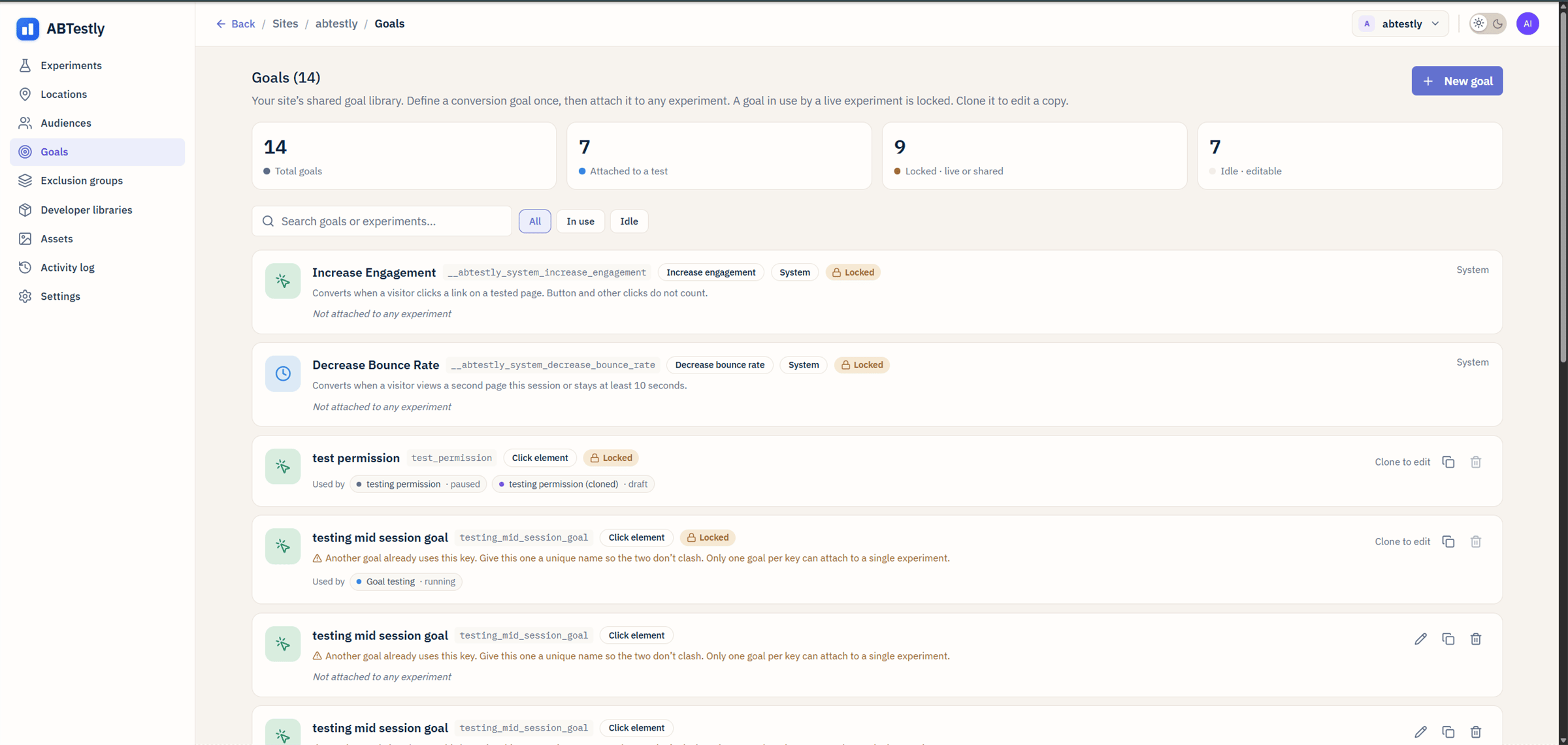
> Every site gets two goals for free, Increase Engagement and Decrease Bounce Rate, and every new experiment auto-attaches both. Here is what they measure and why they exist.
Every ABTestly site ships with two goals already defined and every new
experiment automatically has both attached as guardrails. You cannot edit
or delete them, and you do not have to configure anything to use them.
They are marked **System** in the goal library.
 ## Why they exist
The two most common ways an experiment secretly harms your site are:
1. It kills engagement, the click-through, the second-page-view, the
thing that leads to your real conversion.
2. It causes people to bounce.
Every experiment worth running should be checked against both, and that
should not depend on you remembering to configure it. So ABTestly
configures it for you.
## Increase Engagement
**Key:** `__abtestly_system_increase_engagement`
**Type:** Click on any hyperlink inside the tested page.
A visitor "engages" when they click a real hyperlink on your page. Button
clicks that only run JavaScript do not count, the target has to be
something a person navigates to.
Under the hood the snippet installs a single delegated click listener at
the document level, so it is one listener no matter how many experiments
you run.
## Decrease Bounce Rate
**Key:** `__abtestly_system_decrease_bounce_rate`
**Type:** Non-bounce.
A visitor "does not bounce" when either of these is true, whichever
happens first:
* They view a second page in the same session.
* They stay on the page at least ten seconds.
Attribution is cross-page. If the visitor was exposed to your test on page
one, then viewed page two, the non-bounce is credited to that experiment
even though the second view happened on a different URL.
The snippet coordinates delivery through a small state machine, pending
while the ten-second timer runs, queued while a navigation is in flight,
settled once the event has landed. If the browser closes before it can
send, ABTestly does the send opportunistically on the next pageview, up
to a bounded number of retries.
## Both goals as guardrails
By default the two system goals attach as guardrails, not as your primary
metric. On the results page they appear in the guardrail list. A variant
that wins on your primary metric but tanks Engagement or spikes Bounce
Rate will still be called out.
If you have a specific need to make one of them your primary metric.
Increase Engagement on a top-of-funnel landing page test, for example.
you can promote it in the experiment editor's **What to measure** section.
That does not delete the guardrail role; the goal simply shows up under
"primary" on the results page instead of under "guardrails".
## Turning them off
You cannot delete the goals themselves, every site keeps them, but you
can detach them from a specific experiment. In the experiment editor,
under **What to measure**, click the row for the system goal and remove
it. New experiments still get both attached by default.
Two situations where detaching makes sense:
* **A test on an intentionally-terminal page.** A confirmation page has a
bounce rate of nearly 100 % by design. Leave the goal on and every test
on that page will fail the guardrail. Detach and rely on your primary
goal instead.
* **A single-page app where "second page view" does not map cleanly.**
Non-bounce still works, the ten-second timer alone is enough, but you
may want a custom "engaged session" goal that reflects your app's
definition.
## What was there before
Sites created before the roll-out have the two goals seeded retroactively.
No action needed on your part; nothing changes about experiments already
running. The next experiment you create shows both goals attached by
default.
## Why they exist
The two most common ways an experiment secretly harms your site are:
1. It kills engagement, the click-through, the second-page-view, the
thing that leads to your real conversion.
2. It causes people to bounce.
Every experiment worth running should be checked against both, and that
should not depend on you remembering to configure it. So ABTestly
configures it for you.
## Increase Engagement
**Key:** `__abtestly_system_increase_engagement`
**Type:** Click on any hyperlink inside the tested page.
A visitor "engages" when they click a real hyperlink on your page. Button
clicks that only run JavaScript do not count, the target has to be
something a person navigates to.
Under the hood the snippet installs a single delegated click listener at
the document level, so it is one listener no matter how many experiments
you run.
## Decrease Bounce Rate
**Key:** `__abtestly_system_decrease_bounce_rate`
**Type:** Non-bounce.
A visitor "does not bounce" when either of these is true, whichever
happens first:
* They view a second page in the same session.
* They stay on the page at least ten seconds.
Attribution is cross-page. If the visitor was exposed to your test on page
one, then viewed page two, the non-bounce is credited to that experiment
even though the second view happened on a different URL.
The snippet coordinates delivery through a small state machine, pending
while the ten-second timer runs, queued while a navigation is in flight,
settled once the event has landed. If the browser closes before it can
send, ABTestly does the send opportunistically on the next pageview, up
to a bounded number of retries.
## Both goals as guardrails
By default the two system goals attach as guardrails, not as your primary
metric. On the results page they appear in the guardrail list. A variant
that wins on your primary metric but tanks Engagement or spikes Bounce
Rate will still be called out.
If you have a specific need to make one of them your primary metric.
Increase Engagement on a top-of-funnel landing page test, for example.
you can promote it in the experiment editor's **What to measure** section.
That does not delete the guardrail role; the goal simply shows up under
"primary" on the results page instead of under "guardrails".
## Turning them off
You cannot delete the goals themselves, every site keeps them, but you
can detach them from a specific experiment. In the experiment editor,
under **What to measure**, click the row for the system goal and remove
it. New experiments still get both attached by default.
Two situations where detaching makes sense:
* **A test on an intentionally-terminal page.** A confirmation page has a
bounce rate of nearly 100 % by design. Leave the goal on and every test
on that page will fail the guardrail. Detach and rely on your primary
goal instead.
* **A single-page app where "second page view" does not map cleanly.**
Non-bounce still works, the ten-second timer alone is enough, but you
may want a custom "engaged session" goal that reflects your app's
definition.
## What was there before
Sites created before the roll-out have the two goals seeded retroactively.
No action needed on your part; nothing changes about experiments already
running. The next experiment you create shows both goals attached by
default.