> ## Documentation Index
> Fetch the complete documentation index at: https://docs.abtestly.com/llms.txt
> Use this file to discover all available pages before exploring further.
# Variations
> The Original and one or more variants. Each variant is JavaScript, CSS, or a redirect. Editor settings, lints, size caps.
A variation is what you actually change. Every experiment has an
**Original** (unchanged control) plus one or more **variants**. Each
variant carries three things:
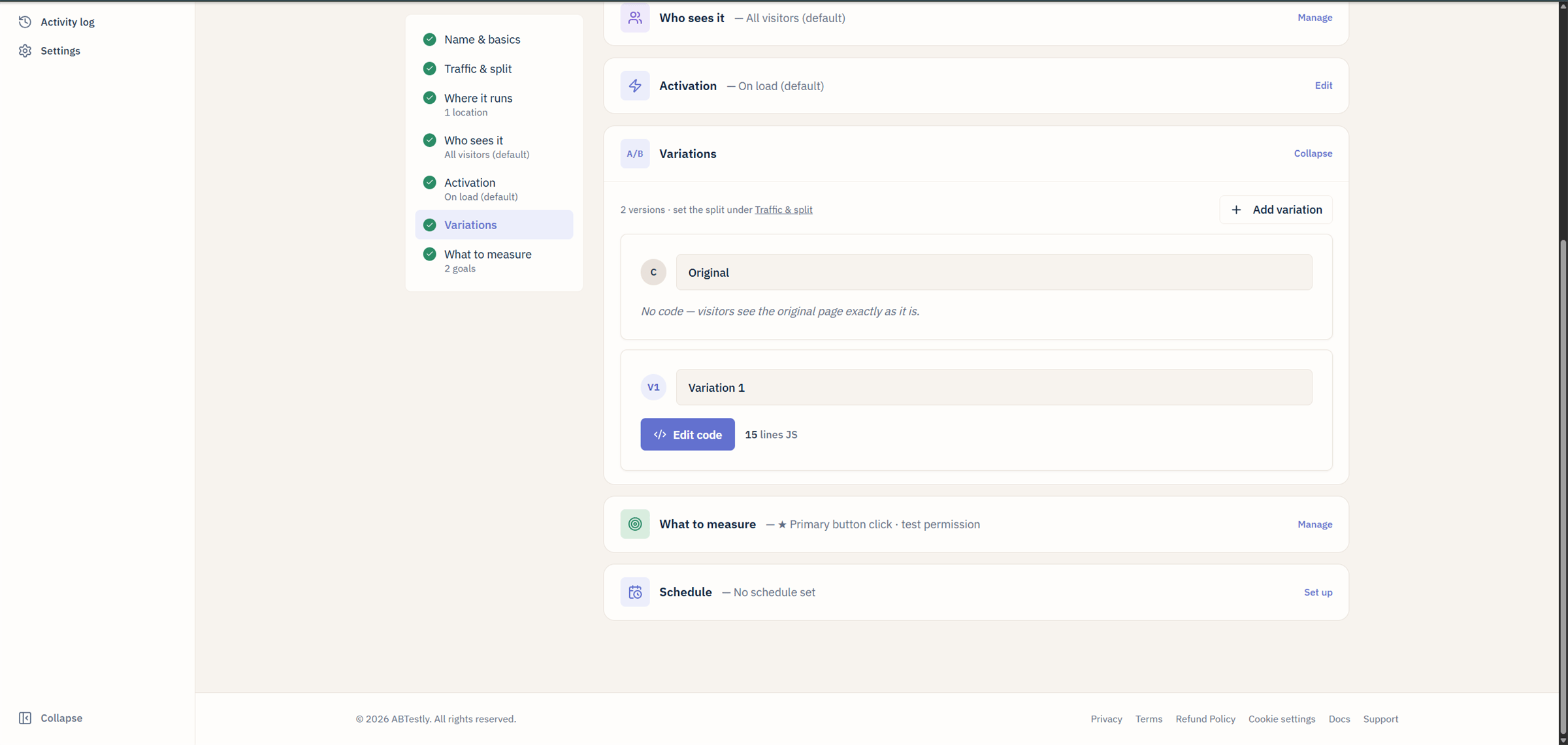 * A **name** and a **short key**, the key is what shows up in reports
and in `ABTESTLY_VARIANT_KEY` at runtime.
* A **weight**, the share of traffic in the split.
* The change itself, **JavaScript**, **CSS**, or a **redirect URL**.
## Adding a variant
Under **Variations**, click **Add variation**. New variants come in at
Even split by default. Delete a variant with the trash icon.
Variant weights are stored as basis points internally (10000 = 100 %).
The editor shows percentages. Auto-even keeps the weights balanced as
you add or remove variants, uncheck it to lock a custom split.
## Writing variant code
Each variant has a JS pane and a CSS pane, both lazy-loaded to keep the
editor light. Cmd/Ctrl+S saves without leaving the editor. Fullscreen
opens for either pane.
The editor is [Monaco](/build/variations#editor-settings), VS Code's
editor, with syntax checking that runs on every change. Save is
**blocked** if there is a syntax error, so a broken variant cannot go
live.
Variant code is executed inside a function. See
[runtime bindings](/developer/runtime-bindings) for what globals are in
scope (spoiler: `ABTESTLY_EXP_KEY`, `ABTESTLY_EXP_ID`, and
`ABTESTLY_VARIANT_KEY`).
### Anatomy of a variant JS function
```js theme={null}
// Wait for the target to exist, then change it.
abtestly.waitFor('.hero h1', (el) => {
el.textContent = 'Try the new headline';
});
// Register a cleanup so the DOM undoes itself on SPA route change.
abtestly.onCleanup(ABTESTLY_EXP_ID, () => {
document.querySelector('.hero h1').textContent = 'Original headline';
});
```
Most variants only need `waitFor` and a mutation. The `onCleanup` is
required only if you turned on SPA support and the change would carry
into a route that does not match the test.
## Redirect variants
For split-URL tests, set the variant's **Redirect URL** to the alternate
page. On assignment, the snippet fires the exposure event and then
navigates the browser to the redirect URL. Original stays put.
Use redirect variants when:
* The two treatments live on different URLs already (e.g. a real A/B
between two landing pages).
* Your variant is heavy enough that a client-side rewrite would flicker.
## Lints and warnings
The editor runs a handful of lint checks and shows them inline before
save:
* **Syntax errors**, save-blocking.
* **Reserved-name collisions**, variables you name `document`, `window`,
`abtestly`, etc.
* **Dev-hook advisories**, you called `abtestly.dev.apply()`; that
will silently no-op in production.
* **Size warnings**, the config-size budget is per plan; over the cap
blocks publish.
## Editor settings
Cog icon on the editor pane opens the settings modal. Persists in
localStorage, they follow you across experiments.
* **Theme**, a handful of Shiki themes, light and dark.
* **Font size**.
* **Word wrap**.
* **Ligatures**, on by default if your font supports them.
## Editor freezes on running tests
Once an experiment has been running long enough for its results to
matter, the variant code freezes. Attempting to edit shows a lock. This
prevents accidentally changing the treatment mid-flight and inflating
your effect size.
If you legitimately need to change a running variant, you found a bug
in your code, say, either:
* **Pause the experiment, edit, resume.** The clock resets on the
results page and you get a new epoch.
* **Reset data.** Discards the run so far and starts fresh with the
updated code.
Both are confirmation-gated. See
[Reset data](/build/create#autosave-and-drafts) for what actually
happens.
## Dev libraries
Common libraries, Splide, GLightbox, and a curated few others, can
be attached from a picker instead of pasted into every variant. See
[Dev libraries](/build/dev-libraries).
## Preview before publish
Any variant can be previewed on your live site without launching the
test. See [Preview modal](/preview/preview-modal).
* A **name** and a **short key**, the key is what shows up in reports
and in `ABTESTLY_VARIANT_KEY` at runtime.
* A **weight**, the share of traffic in the split.
* The change itself, **JavaScript**, **CSS**, or a **redirect URL**.
## Adding a variant
Under **Variations**, click **Add variation**. New variants come in at
Even split by default. Delete a variant with the trash icon.
Variant weights are stored as basis points internally (10000 = 100 %).
The editor shows percentages. Auto-even keeps the weights balanced as
you add or remove variants, uncheck it to lock a custom split.
## Writing variant code
Each variant has a JS pane and a CSS pane, both lazy-loaded to keep the
editor light. Cmd/Ctrl+S saves without leaving the editor. Fullscreen
opens for either pane.
The editor is [Monaco](/build/variations#editor-settings), VS Code's
editor, with syntax checking that runs on every change. Save is
**blocked** if there is a syntax error, so a broken variant cannot go
live.
Variant code is executed inside a function. See
[runtime bindings](/developer/runtime-bindings) for what globals are in
scope (spoiler: `ABTESTLY_EXP_KEY`, `ABTESTLY_EXP_ID`, and
`ABTESTLY_VARIANT_KEY`).
### Anatomy of a variant JS function
```js theme={null}
// Wait for the target to exist, then change it.
abtestly.waitFor('.hero h1', (el) => {
el.textContent = 'Try the new headline';
});
// Register a cleanup so the DOM undoes itself on SPA route change.
abtestly.onCleanup(ABTESTLY_EXP_ID, () => {
document.querySelector('.hero h1').textContent = 'Original headline';
});
```
Most variants only need `waitFor` and a mutation. The `onCleanup` is
required only if you turned on SPA support and the change would carry
into a route that does not match the test.
## Redirect variants
For split-URL tests, set the variant's **Redirect URL** to the alternate
page. On assignment, the snippet fires the exposure event and then
navigates the browser to the redirect URL. Original stays put.
Use redirect variants when:
* The two treatments live on different URLs already (e.g. a real A/B
between two landing pages).
* Your variant is heavy enough that a client-side rewrite would flicker.
## Lints and warnings
The editor runs a handful of lint checks and shows them inline before
save:
* **Syntax errors**, save-blocking.
* **Reserved-name collisions**, variables you name `document`, `window`,
`abtestly`, etc.
* **Dev-hook advisories**, you called `abtestly.dev.apply()`; that
will silently no-op in production.
* **Size warnings**, the config-size budget is per plan; over the cap
blocks publish.
## Editor settings
Cog icon on the editor pane opens the settings modal. Persists in
localStorage, they follow you across experiments.
* **Theme**, a handful of Shiki themes, light and dark.
* **Font size**.
* **Word wrap**.
* **Ligatures**, on by default if your font supports them.
## Editor freezes on running tests
Once an experiment has been running long enough for its results to
matter, the variant code freezes. Attempting to edit shows a lock. This
prevents accidentally changing the treatment mid-flight and inflating
your effect size.
If you legitimately need to change a running variant, you found a bug
in your code, say, either:
* **Pause the experiment, edit, resume.** The clock resets on the
results page and you get a new epoch.
* **Reset data.** Discards the run so far and starts fresh with the
updated code.
Both are confirmation-gated. See
[Reset data](/build/create#autosave-and-drafts) for what actually
happens.
## Dev libraries
Common libraries, Splide, GLightbox, and a curated few others, can
be attached from a picker instead of pasted into every variant. See
[Dev libraries](/build/dev-libraries).
## Preview before publish
Any variant can be previewed on your live site without launching the
test. See [Preview modal](/preview/preview-modal).