> ## Documentation Index
> Fetch the complete documentation index at: https://docs.abtestly.com/llms.txt
> Use this file to discover all available pages before exploring further.
# Create an experiment
> The editor is one screen with seven sections. Fill what you care about, leave the rest at defaults, and the pipeline lights up green.
Every experiment lives on a single site. Open the site and click
**New experiment** on the Experiments tab.
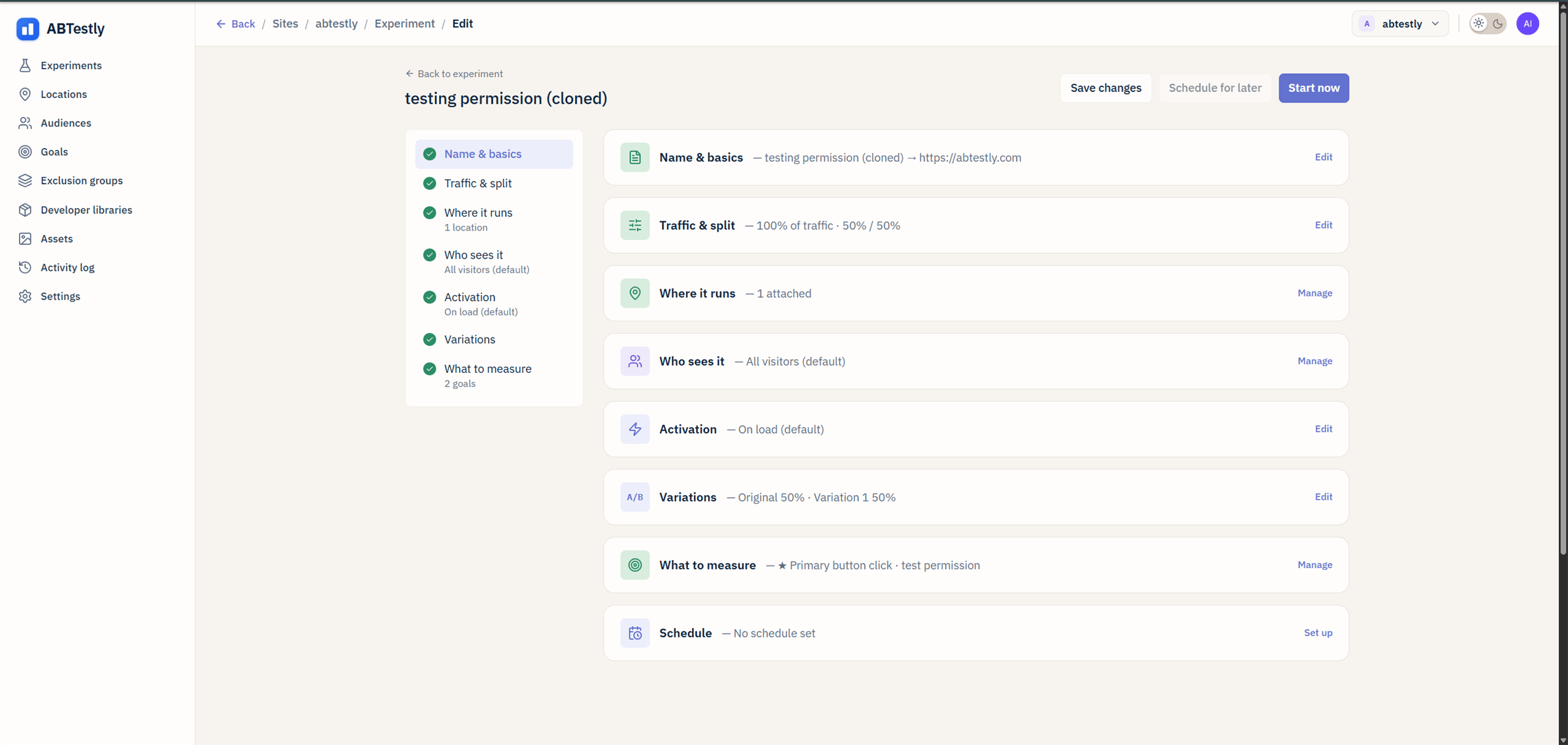 ## The sections
A human name for the test and the URL you want to run it on. The URL
can be any page on the site, the actual page-matching happens under
**Where it runs**; this field is a shortcut for the common case of
"run it on this exact URL".
Two numbers.
* **Allocation**, what percent of matching visitors enter the test.
100 % by default. Lower this when you want a canary.
* **Split**, how entered visitors divide across variants. 50/50 with
two variants; ABTestly rebalances to even weights automatically as
you add or remove variants (uncheck **Auto-even** to lock a
custom split).
Weights are stored as basis points internally (10000 = 100 %). You
just see percentages.
URL rules that decide which pages qualify. Pick a saved
[Location](/targeting/saved-lists) or write rules inline. See
[URL rules](/targeting/url-rules) for the operator list and the
case-insensitive default.
Visitor rules. Country, device, source, cookie value, and a few dozen
more. Leave empty to include everyone. See
[Audiences](/targeting/audiences).
When the exposure fires. On load, on click, when an element is
visible, or manual. See
[Activation triggers](/targeting/activation-triggers).
The Original (baseline) and one or more variants. Each variant is a
piece of JavaScript, CSS, or both, applied to matching pages. Split
URL / redirect variants are supported. See
[Variations](/build/variations).
One primary goal, plus any number of guardrails. The two system
goals attach automatically as guardrails. See
[Goals overview](/goals/overview).
Optional. Start on a date, stop on a date, cap the run length. See
[Schedule](/build/schedule).
## Autosave and drafts
Everything you type is autosaved. If the browser tab crashes, refresh.
the editor offers to restore your unsaved edits.
If you close the tab in the middle of a save, ABTestly warns you first
so you do not lose work in flight. See
[Autosave and drafts](/build/autosave).
## The publish gate
The **Start now** and **Schedule for later** buttons require the
**Publish experiments** permission on this site. If they are grayed out
for you, you have the Dev role but no publish key, ask an admin to
turn it on for the site under
[Team & access](/team/members-and-roles).
## Save without launching
**Save changes** stores the draft without going live. You can share the
link with a stakeholder for review. When they approve, come back and
click Start.
## Section by section, in practice
For a first pass, most sections can be left at their default. The
minimum viable test:
* Name it.
* Confirm the URL under Name and basics.
* Add one variant under Variations.
* Under What to measure, pick a primary goal.
* **Start now**.
Everything else defaults to the sane thing (all pages, all visitors,
On load, 50/50 split, no schedule). Once you have one running, iterate.
## The sections
A human name for the test and the URL you want to run it on. The URL
can be any page on the site, the actual page-matching happens under
**Where it runs**; this field is a shortcut for the common case of
"run it on this exact URL".
Two numbers.
* **Allocation**, what percent of matching visitors enter the test.
100 % by default. Lower this when you want a canary.
* **Split**, how entered visitors divide across variants. 50/50 with
two variants; ABTestly rebalances to even weights automatically as
you add or remove variants (uncheck **Auto-even** to lock a
custom split).
Weights are stored as basis points internally (10000 = 100 %). You
just see percentages.
URL rules that decide which pages qualify. Pick a saved
[Location](/targeting/saved-lists) or write rules inline. See
[URL rules](/targeting/url-rules) for the operator list and the
case-insensitive default.
Visitor rules. Country, device, source, cookie value, and a few dozen
more. Leave empty to include everyone. See
[Audiences](/targeting/audiences).
When the exposure fires. On load, on click, when an element is
visible, or manual. See
[Activation triggers](/targeting/activation-triggers).
The Original (baseline) and one or more variants. Each variant is a
piece of JavaScript, CSS, or both, applied to matching pages. Split
URL / redirect variants are supported. See
[Variations](/build/variations).
One primary goal, plus any number of guardrails. The two system
goals attach automatically as guardrails. See
[Goals overview](/goals/overview).
Optional. Start on a date, stop on a date, cap the run length. See
[Schedule](/build/schedule).
## Autosave and drafts
Everything you type is autosaved. If the browser tab crashes, refresh.
the editor offers to restore your unsaved edits.
If you close the tab in the middle of a save, ABTestly warns you first
so you do not lose work in flight. See
[Autosave and drafts](/build/autosave).
## The publish gate
The **Start now** and **Schedule for later** buttons require the
**Publish experiments** permission on this site. If they are grayed out
for you, you have the Dev role but no publish key, ask an admin to
turn it on for the site under
[Team & access](/team/members-and-roles).
## Save without launching
**Save changes** stores the draft without going live. You can share the
link with a stakeholder for review. When they approve, come back and
click Start.
## Section by section, in practice
For a first pass, most sections can be left at their default. The
minimum viable test:
* Name it.
* Confirm the URL under Name and basics.
* Add one variant under Variations.
* Under What to measure, pick a primary goal.
* **Start now**.
Everything else defaults to the sane thing (all pages, all visitors,
On load, 50/50 split, no schedule). Once you have one running, iterate.